
Pay a referral or consultant fee
- Admin and clinic owner
Short answer
In Clinizy Care, open Billing and press the Referral fees tab. Pick the month, press a referrer’s name to see the bills behind their share, and press Finalise statement once the month has ended. Then pay the referrer and press Record payout with the reference.
Before you start
- Switch on fee sharing in Settings, under Finance controls. It is off until you do.
- Add your sharing rules first. No fee is shared until a rule exists.
- Know how you will pay: cash, UPI, bank transfer or cheque.
Steps
Open Billing and press the Referral fees tab.
Tip:No tab? Fee sharing is still off. Switch it on in Finance controls.
Pick the month in Month. It starts on last month.
Press a referrer’s name to see the bills behind their share.
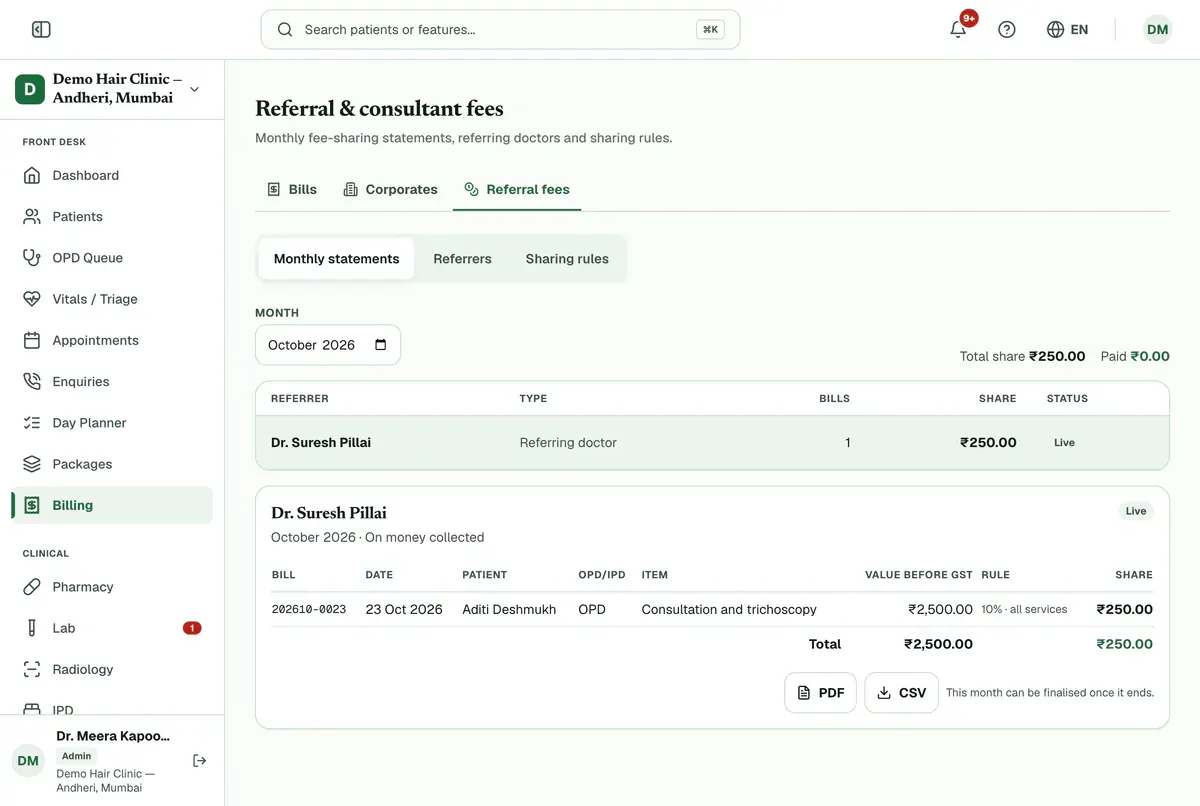
Step 3 of 7 Check the lines. Press PDF or CSV if you need a copy.
Press Finalise statement once the month has ended.
Careful:To change an unpaid statement, press Void, give a reason and finalise it again.
Pay the referrer by cash, UPI, bank transfer or cheque, then press Record payout.
Tip:The payout is for the full statement amount shown.
Choose how you paid, add the reference or UTR and the date paid, and press Record payout in the box. The status turns Paid.
Careful:The payout date cannot be in the future.
If something goes wrong
Why is a referrer’s share missing or zero?
No fee is shared until a rule exists. Open Sharing rules, press Add rule and set who it applies to and how much is shared.
Who can record a payout?
Only people allowed to pay fees. By default that is the admin. Bank and UPI details are hidden from everyone else.
What should I know before using fee sharing?
NMC’s Professional Conduct Regulations prohibit commission for referring patients. Use fee sharing only for lawful, written arrangements, such as with visiting consultants. The clinic is responsible for how it is used.
Related guides
Approve or reject a discount request
Open Billing and press the Approvals tab. Choose Waiting for approval, read the amount, percentage and reason, then press Approve or Reject. Rejecting needs a note. An approved bill discount goes onto the draft bill, which the desk then finalises.
3 minIncluded in Nursing Home and aboveBill a company and collect its payment
Open Billing, press the Corporates tab and add the company with Add corporate. Then open an unpaid bill and press Bill to corporate to move its balance to the company’s credit. When the company pays, open its page and press Record payment. The oldest bills are settled first.
5 minIncluded in Nursing Home and aboveCreate a GST invoice
Open Billing, press New Bill, choose the patient or tick Walk-in customer, and type each item with its quantity, rate and GST percentage. Check the total, press Create Bill and confirm. The bill opens straight away so you can press Record Payment and take cash, UPI or card.
4 minIncluded in Clinic and above
Was this guide helpful?
Last updated 23 Oct 2026By the Clinizy Care product team