
Record hair vitals and watch progress
- Admin and clinic owner
- Doctor
- Nurse
- Technician
Short answer
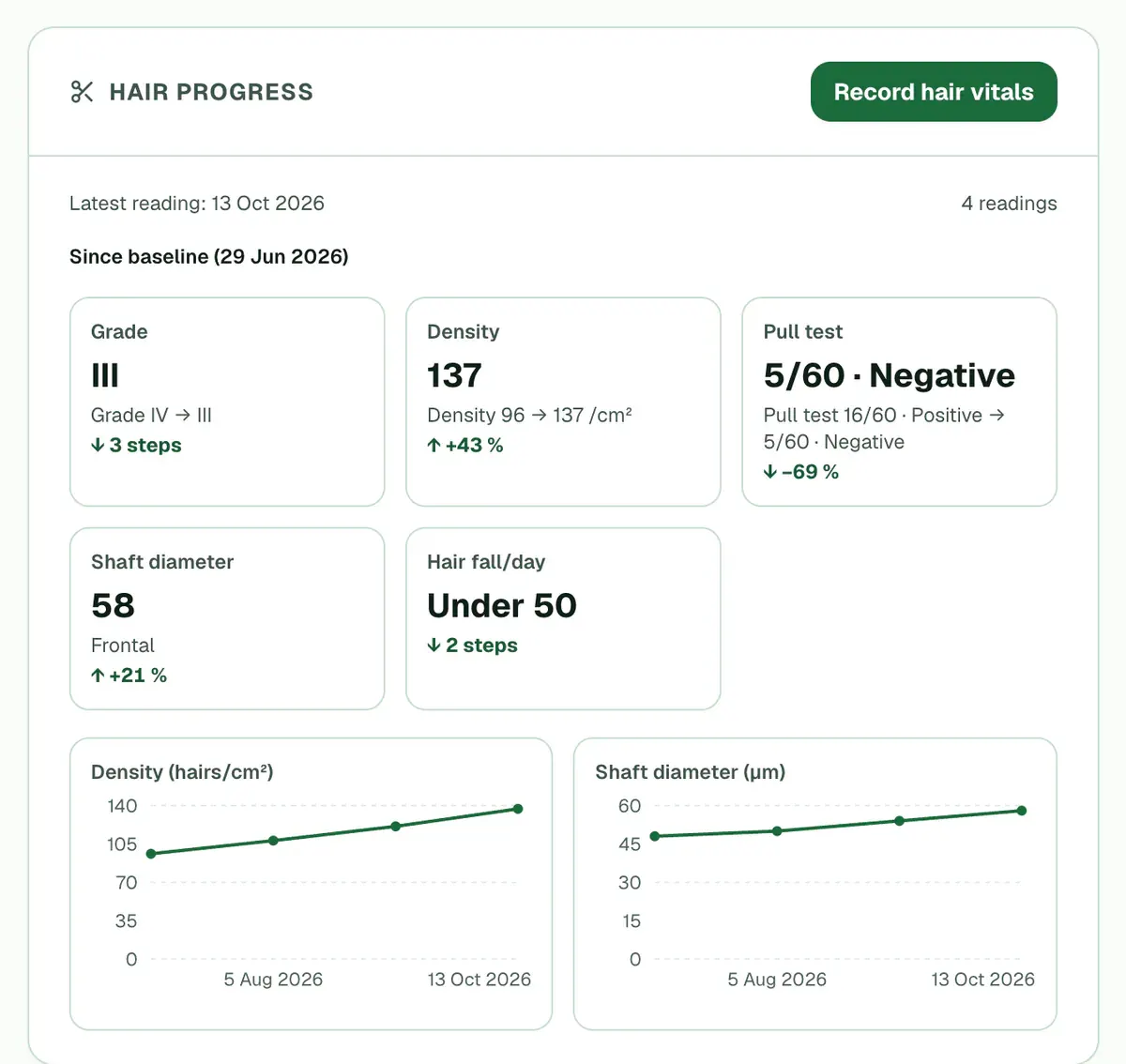
In Clinizy Care, open the patient’s record and find the Hair progress card. Press Record hair vitals, enter the readings you have, such as grade, density or pull test, and press Save hair vitals. The first reading is the baseline. From the next one, the card shows what changed.
Before you start
- Check that the Hair progress card shows on the record. It is hidden if your clinic does not use hair vitals.
- Have your readings ready. Every field is optional, but you need at least one.
Steps
Open the patient’s record and find the Hair progress card.
Step 1 of 8 Press Record hair vitals.
Tip:Or press Record vitals on the patient card and pick Hair vitals. If the patient is in today’s queue, the reading is linked to that visit.
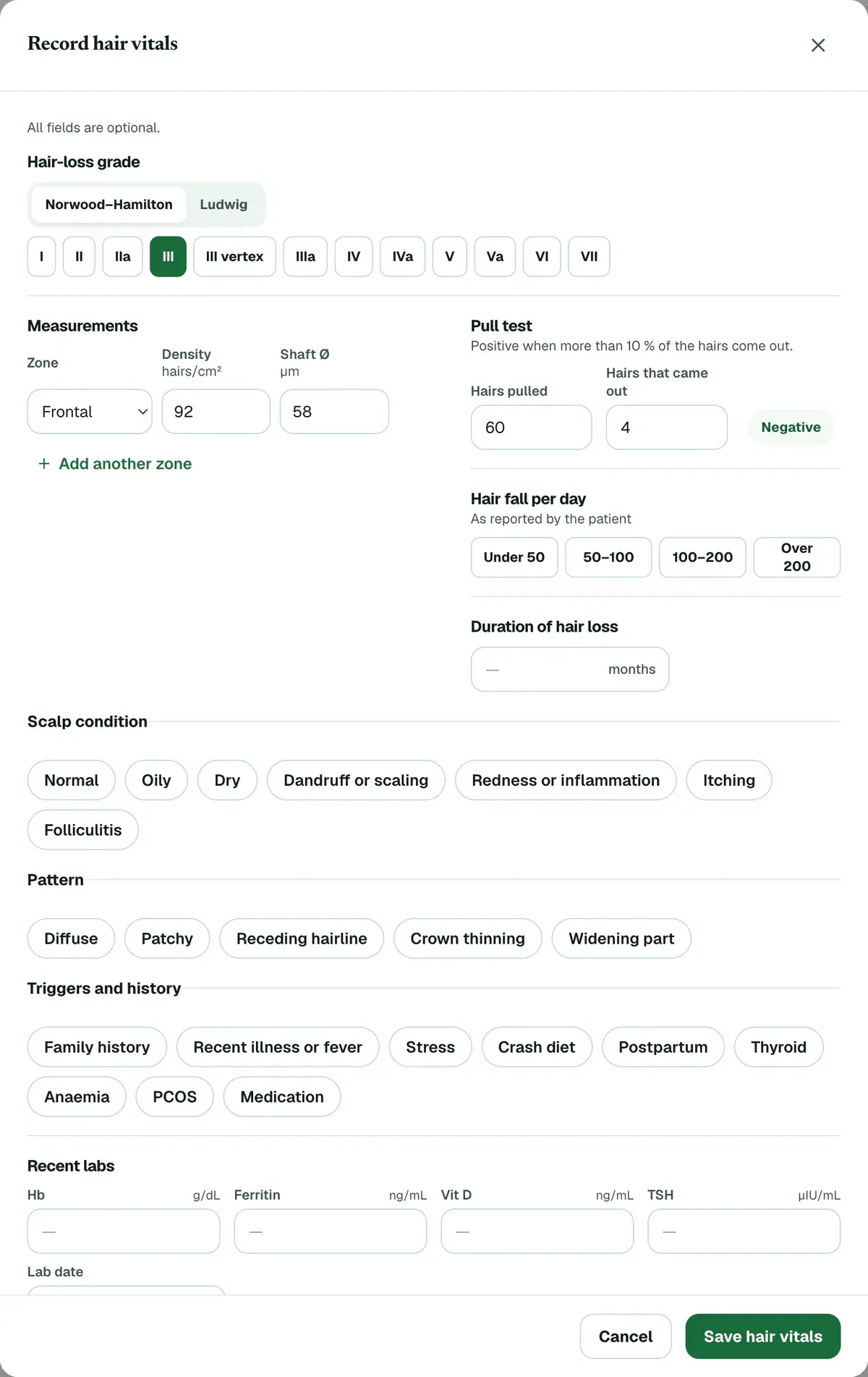
Pick the Hair-loss grade on the scale shown. You can switch the scale if you need to.
Step 3 of 8 Tip:The scale starts from the patient’s gender.
Enter Hair density and Shaft diameter for a Zone. Press Add another zone for the next one.
Tip:You can record up to four zones.
Enter Hairs pulled and Hairs that came out for the Pull test.
Tip:The form starts at 60 hairs pulled. It shows Positive or Negative once you enter the hairs that came out.
Add Hair fall per day, Scalp condition, Pattern, Triggers and history, Recent labs or Notes if you have them.
Press Save hair vitals. A message confirms that the reading was saved.
Read the Hair progress card. The first reading is the baseline, and later ones show the change since then.
Tip:You can also record hair vitals from the Vitals form, in its Hair vitals section.
If something goes wrong
Which numbers does the form accept?
Density must be 0 to 400 hairs/cm² and shaft diameter 20 to 150 µm. Hairs pulled is 1 to 200, and hairs that came out cannot be more than that. Duration is whole months, 0 to 720.
Do I have to fill every field?
No. Every field is optional, but you must enter at least one reading before you can save.
Who can record hair vitals?
Roles that can record vitals or write prescriptions, such as admins, doctors, nurses and technicians, see Record hair vitals. Other roles can read the card but cannot add readings.
Can I record hair vitals from the OPD queue?
Yes. In OPD Queue, press Record hair vitals on the patient’s card. It opens the Vitals form at Hair vitals. The button gets a tick once the reading is saved, and the card’s progress shows Hair vitals as an optional step.
Related guides
Correct a wrong patient detail
Open the patient’s record and press Edit Details. Change the wrong detail, such as the phone number, date of birth or allergies, then press Save Changes. If someone else saved the record first, Clinizy Care tells you and keeps what you typed, so nothing is lost.
3 minIncluded in Clinic and aboveRead a patient’s full record
Open Patients, search for the patient and press their name. The card on the left shows who they are and warns about allergies. On the right you will find the visit history, documents, prescriptions, lab orders, appointments and bills. You see only the parts your role needs.
4 minIncluded in Clinic and aboveTake and compare clinical photos
Open the patient’s record, find the Photos card and press Add photos. Take or choose a photo for each view, then press Save photos. Once there are two sessions, press Compare to look at any two together. The card shows only if your clinic has the photo gallery, which comes with the hair and skin packs.
5 minAdd-on: Clinical photo gallery
Was this guide helpful?
Last updated 26 Oct 2026By the Clinizy Care product team