
Record a patient’s vitals
- Admin and clinic owner
- Nurse
- Technician
Short answer
In Clinizy Care, open Vitals / Triage. Waiting patients are listed with the most urgent first. Press Record vitals next to a patient, type each reading and press Tab to move on, then press Save Vitals. Readings outside the normal range are highlighted. You can update a reading later.
Before you start
- Have the patient’s readings ready, such as blood pressure, pulse and temperature.
- Check that the patient is in today’s OPD queue. Vitals are saved on today’s visit.
Steps
Open Vitals / Triage from the left menu.
Tip:On a patient’s record, Record vitals brings you here and opens the form if the patient is in today’s queue.
Start at the top of Vitals pending and press Record vitals next to the patient.
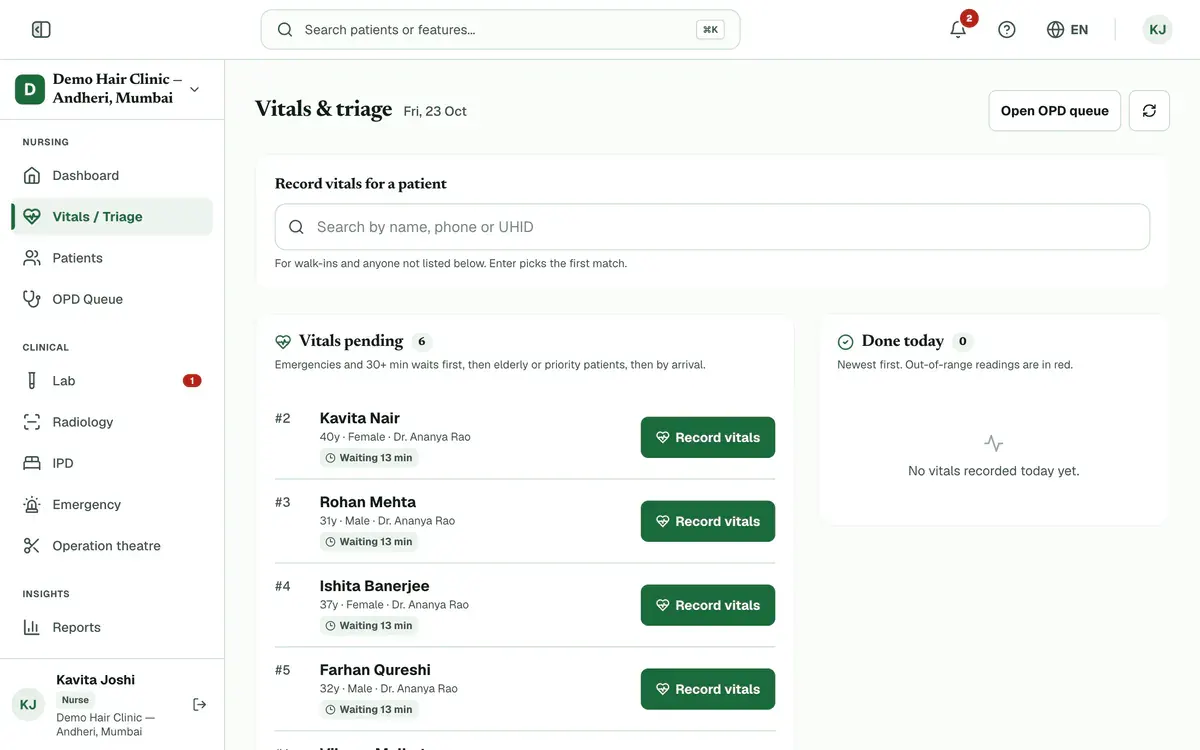
Step 2 of 7 Tip:Emergencies and waits of 30 minutes or more come first, then elderly or priority patients, then the rest by arrival.
Search by name, phone or UHID in Record vitals for a patient for anyone who is not listed, and pick the patient.
Careful:If the patient is not in today’s queue, reception must check them in first. Admins can press Add to queue.
Type each reading you have. Press Tab to move to the next field.
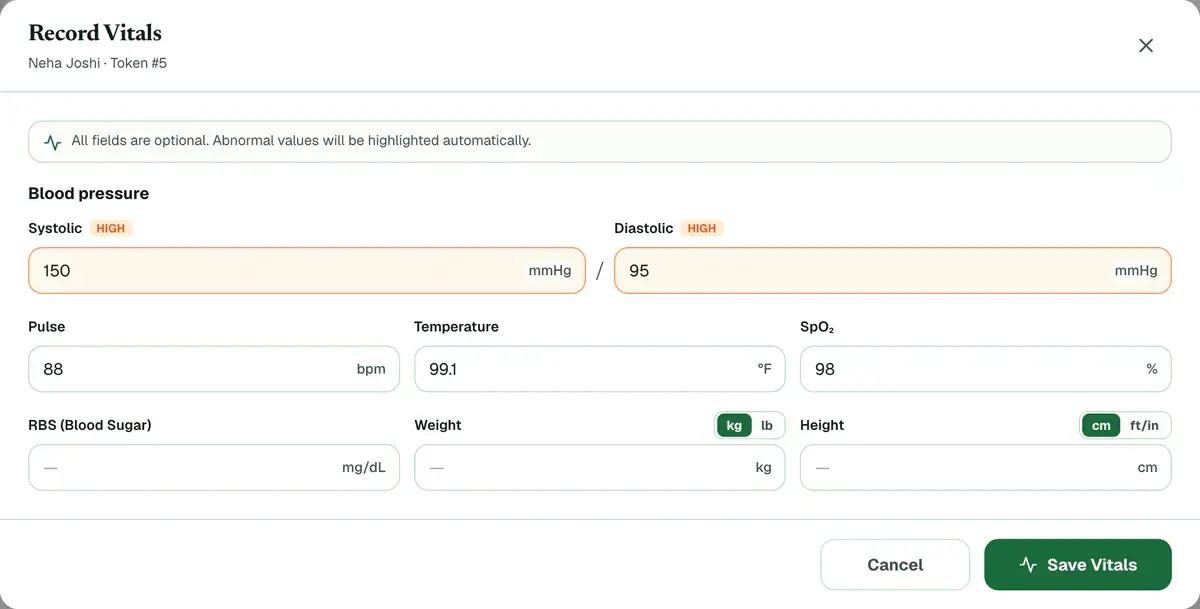
Step 4 of 7 Tip:Every field is optional, but you need at least one. Switch weight between kg and lb, and height between cm and ft/in. The form remembers your choice on this device.
Look at any highlighted reading and fix a typing mistake before you save.
Tip:If Systolic is not higher than Diastolic, a warning appears. You can still save.
Press Save Vitals, or press Enter. A message confirms that the vitals were saved.
Check Done today. Out-of-range readings carry a Check tag. Press Update to correct a reading.
Tip:In OPD Queue, each patient’s card shows how far the visit has got. Once vitals are saved, Vitals gets a tick.
If something goes wrong
Which numbers does the form accept?
Systolic is 50 to 300 and diastolic 30 to 200 mmHg. Pulse is 20 to 300 bpm, temperature 90 to 115 °F, SpO₂ 50 to 100 %, and sugar 20 to 1000 mg/dL. Weight is 0.5 to 500 kg and height 20 to 300 cm.
Why can’t I find the patient in the list?
Only waiting patients who have no vitals yet appear in the list. Search for anyone else by name, phone or UHID in Record vitals for a patient.
Can I fix a wrong reading?
Yes. Find the patient under Done today, press Update, change the value and save. The form shows who recorded the last reading.
What changes if my clinic has the hair or skin pack?
The form gets a second part for Hair vitals or Skin vitals, and those readings are optional. On a patient’s record, Record vitals opens a short menu. Pick General vitals for the readings in this guide.
Related guides
Order lab tests for a patient
Open Lab, go to the Orders tab and press New Order. Pick the patient and the tests, choose the priority and press Create Order. The order then moves through the lab from Ordered to Completed, and you can follow it in the same list.
4 minIncluded in Nursing Home and abovePrint or share a prescription
Open Prescriptions and find the finalized prescription under Recent Prescriptions. Press Print to print it, or WhatsApp to send it to the patient. The menu on the row also has Preview, Save PDF and Email. Drafts cannot be printed or sent.
3 minIncluded in Clinic and aboveUse prescription templates
Open Prescriptions and find the Template library. Press Use on a template to start a prescription with the medicines filled in, then choose the patient and check every dose. You can also copy a starter template or save your own prescription as a template.
4 minIncluded in Clinic and above
Was this guide helpful?
Last updated 26 Oct 2026By the Clinizy Care product team