
Set up branches
- Admin and clinic owner
Short answer
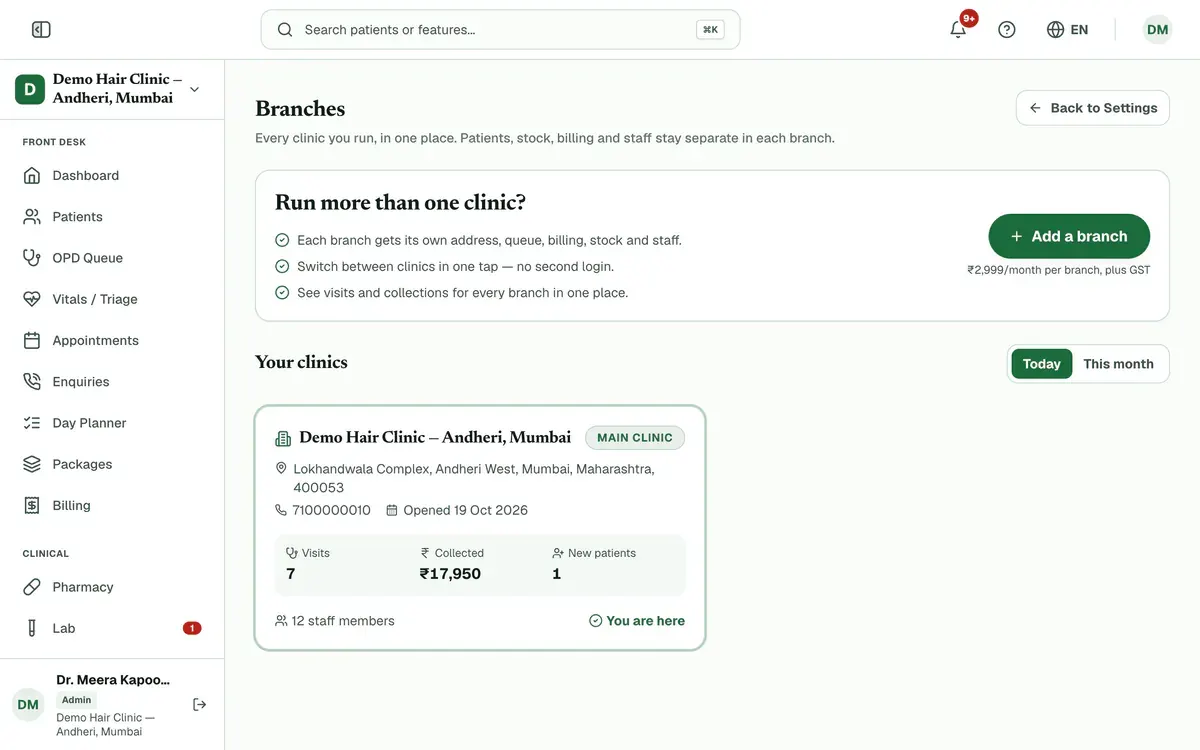
In Clinizy Care, open Settings and press Branches. Check how many branches you use, then press Open a branch and fill in the branch name and address. Each branch keeps its own patients, stock, billing and staff. Press Switch on a branch card to work inside it.
Before you start
- Sign in as the clinic admin of your main clinic.
- Have the new branch’s name, address and PIN code ready.
- Keep its GSTIN handy only if the branch is registered separately.
Steps
Open Settings, then press Branches.
Check how many branches you use out of your allowance, and the visits and collections of all clinics together.
Press Open a branch to open the form.
Step 3 of 8 Careful:If you see Add a branch instead, you have no free branch. Add one from Add-ons first.
Enter the branch name, address, city, state and 6-digit PIN code. Phone and GSTIN are optional.
Tip:Leave the phone blank to use the main clinic’s number.
Keep Copy my services and prices on so the branch starts with your price list.
Press Open branch.
Tip:You get admin access to the new branch straight away.
Press Switch on a branch card to work inside that branch.
Tip:Patients, stock, billing and staff stay separate in each branch.
Choose Today or This month to compare visits, collections and new patients.
If something goes wrong
Can a branch see my main clinic’s patients?
No. Patients, stock, billing and staff stay separate in each branch.
Can I open a branch from inside a branch?
No. Open new branches from the main clinic. A branch page shows a button to switch back to it.
Where do I manage the plan and billing for a branch?
At the main clinic. The plan, billing, add-ons and the all-branches view are all there.
Related guides
Manage add-ons
Open Settings and press Add-ons. See how many branches and doctor and staff seats you use. Choose the extra ones you need with the plus button, check the total and pay securely online. The add-on switches on as soon as the payment is confirmed.
4 minIncluded in Clinic and aboveReview the audit trail
Open Settings and press Audit logs. Each row shows who did what, when, and from which IP address. Narrow the list by search, record type, action or dates. Press a row to see its details, and press Export CSV to download the rows that match.
3 minIncluded in Clinic and aboveChoose what each role can see
Open Settings and press Roles & permissions. Pick a role, then switch each permission on or off. The What this role will see panel shows the menu that role will get before you save. Press Save changes and confirm. Signed-in staff get the change within a few minutes, with no new login needed.
4 minIncluded in Clinic and above
Was this guide helpful?
Last updated 23 Oct 2026By the Clinizy Care product team