
Set discount limits and fee sharing
- Admin and clinic owner
Short answer
In Clinizy Care, open Settings and press Finance controls. Turn on the Ask for approval above a limit toggle, set the limit in Above % and Above ₹, and give a role its own limit if needed. Read the NMC note before fee sharing, then press Save settings to apply the rules to every desk.
Before you start
- You need to be the clinic admin.
- Decide how much discount reception or billing staff may give without asking: a percentage and a rupee amount.
- If you plan to share referral fees, read the NMC note on the same page.
Steps
Open Settings and press Finance controls.
Tip:You find it in the Billing group.
Turn on the toggle Ask for approval above a limit. It is off until you do.
Tip:While it is off, staff can give any discount, but above 20% of the bill still needs a reason.
Untick any place that should not ask for approval: OPD bills, Pharmacy sales or IPD final bills.
Set the clinic limit in Above % and Above ₹.
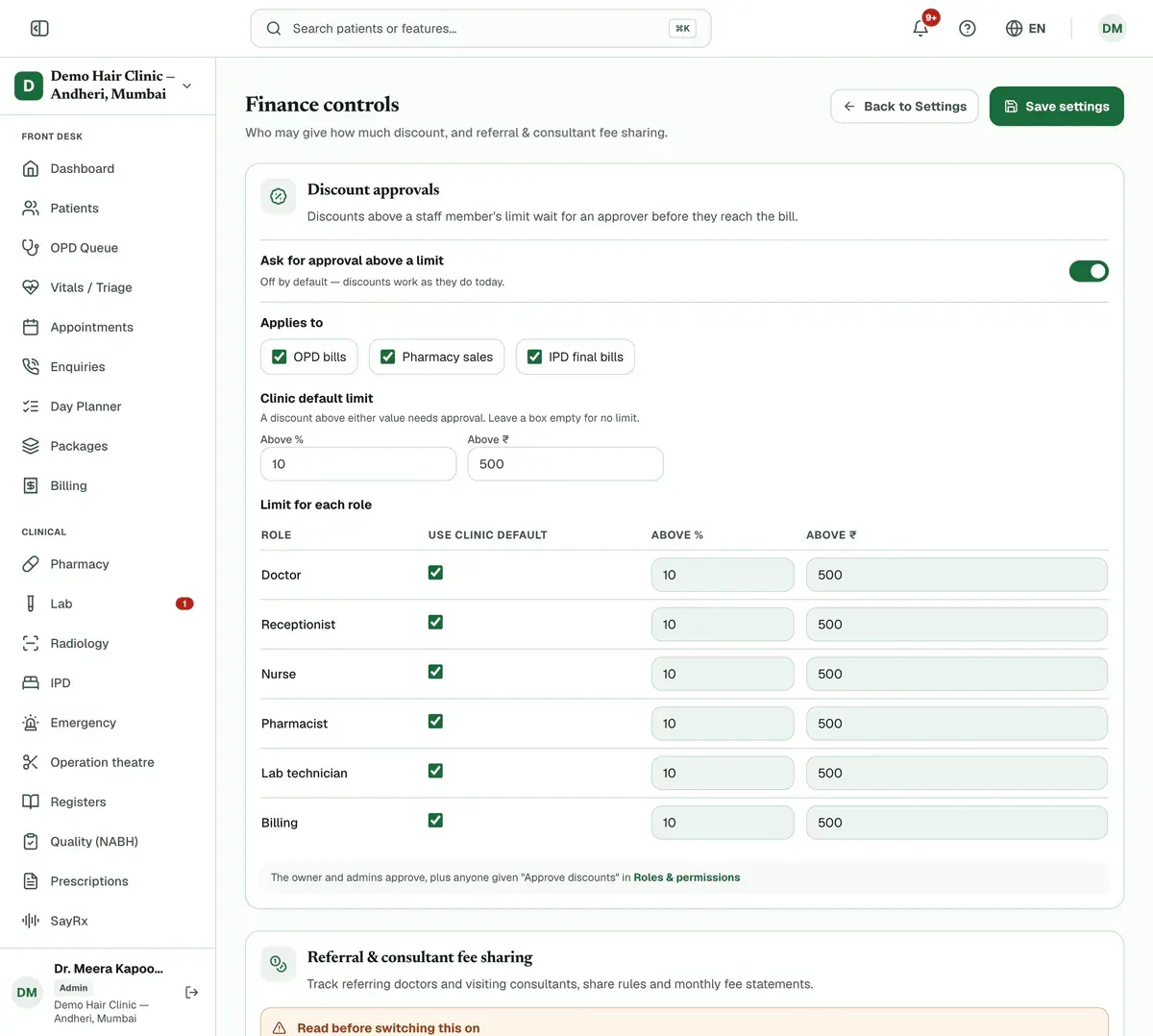
Step 4 of 7 Tip:The starting values are 10% and ₹500. A discount above either one needs approval. Leave a box empty for no limit on it.
Untick Use clinic default on a role’s row to give that role its own limit.
Careful:Admins always approve, so they have no row.
Read the NMC note. Only if you need it, turn on the toggle Switch on referral & consultant fee sharing.
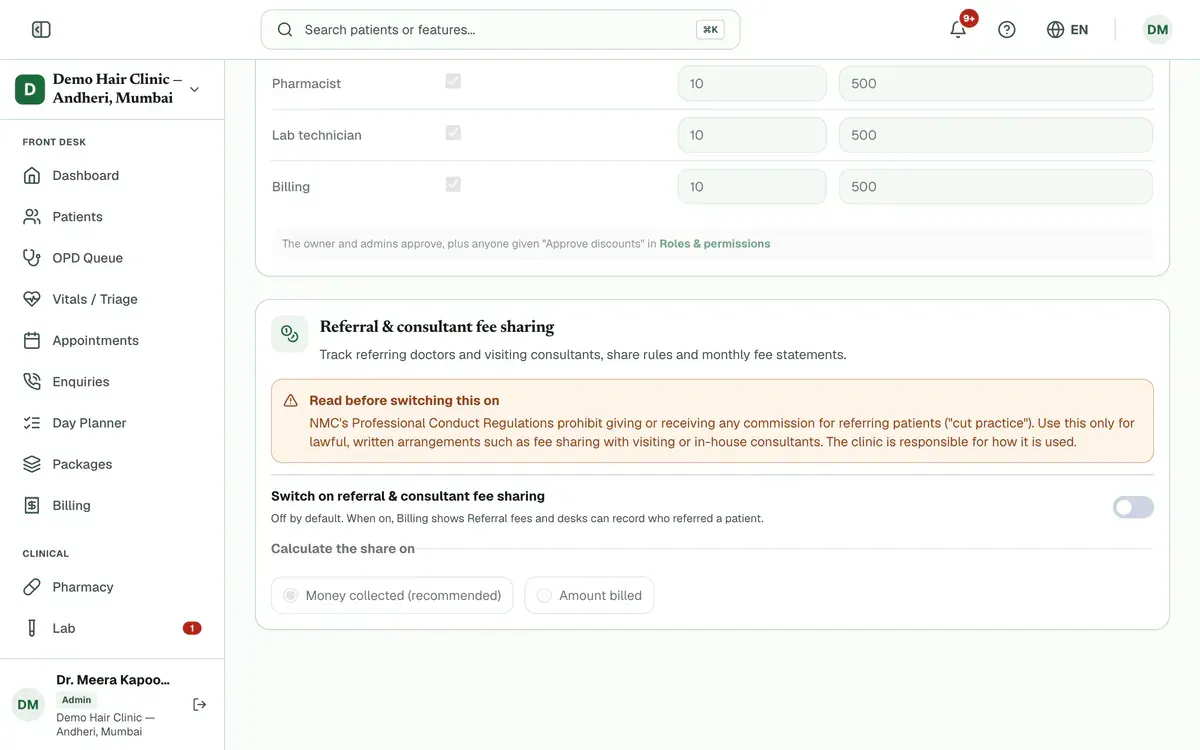
Step 6 of 7 Tip:Under Calculate the share on, choose Money collected (recommended) or Amount billed.
Careful:NMC rules prohibit commission for referring patients. Use fee sharing only for lawful, written arrangements.
Press Save settings. The new rules apply to every desk.
Tip:The button stays greyed out until you change something.
If something goes wrong
What happens when approvals are off?
Staff can give any discount. A discount above 20% of the bill still needs a reason.
Who approves a discount?
Admins approve, plus anyone given the Approve discounts permission in Roles & permissions.
Why can’t I see this setting?
Only admins see it, and only on plans that include the finance controls.
Related guides
Set up IPD packages
Open Settings and choose IPD / surgery packages, or press Packages on the IPD page. Press New package, enter the code, name and price, then set bed-days, inclusions and exclusions. Save it. The billing desk applies the package from the admission’s Daily Charges tab.
5 minIncluded in Nursing Home and aboveApprove or reject a discount request
Open Billing and press the Approvals tab. Choose Waiting for approval, read the amount, percentage and reason, then press Approve or Reject. Rejecting needs a note. An approved bill discount goes onto the draft bill, which the desk then finalises.
3 minIncluded in Nursing Home and aboveBill a company and collect its payment
Open Billing, press the Corporates tab and add the company with Add corporate. Then open an unpaid bill and press Bill to corporate to move its balance to the company’s credit. When the company pays, open its page and press Record payment. The oldest bills are settled first.
5 minIncluded in Nursing Home and above
Was this guide helpful?
Last updated 23 Oct 2026By the Clinizy Care product team