
Track an insurance claim to settlement
- Admin and clinic owner
- Billing staff
- Receptionist
Short answer
In Clinizy Care, open Insurance claims, press New claim and choose the patient. Tick each paper in the documents checklist, then press the next-step button, such as Submit pre-auth. Record what the TPA replies, submit the final claim at discharge, and record the settlement when the insurer pays.
Before you start
- Have the patient’s policy details ready: insurer, TPA, policy number and member ID.
- Have the diagnosis ready. Insurers ask for WHO ICD-10 codes.
- Collect the papers the TPA asks for, such as the policy card and photo ID.
- Remember the insurer decides each claim. Clinizy Care records what they say.
Steps
Open Insurance claims and read the boxes at the top: Pre-auth pending, TPA queries, Awaiting settlement and Due from insurers.
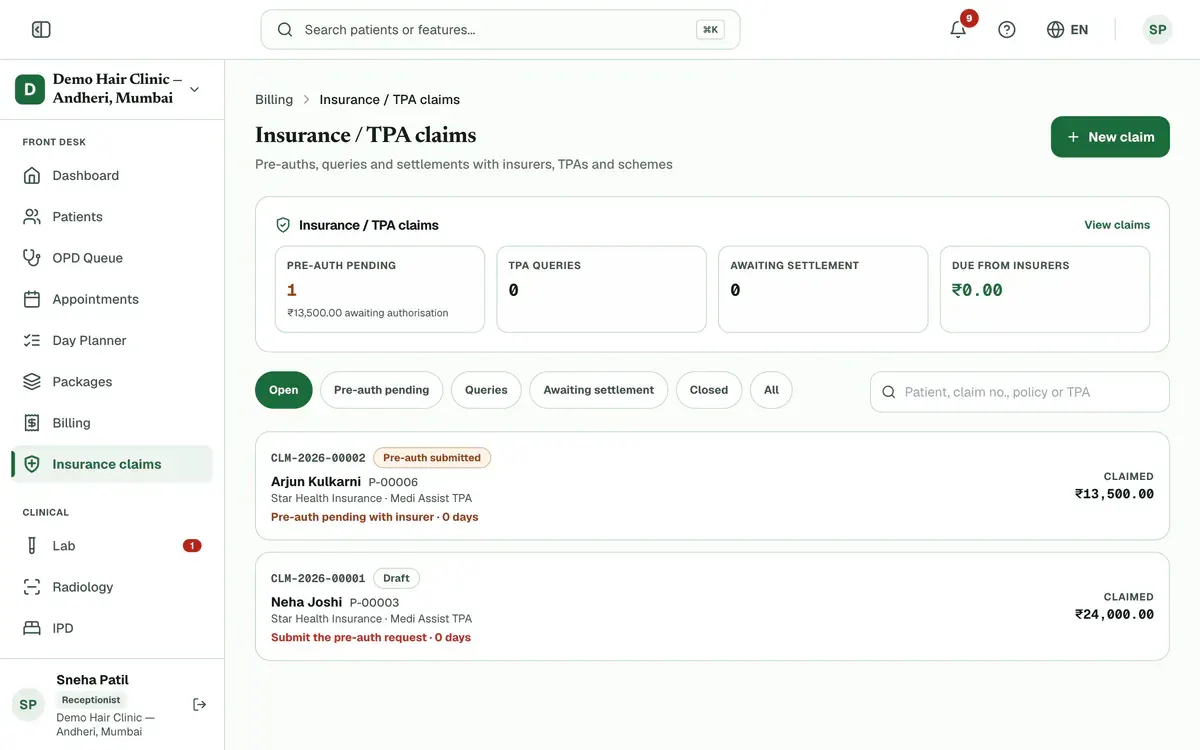
Step 1 of 8 Tip:Use the tabs Pre-auth pending, Queries, Awaiting settlement and Closed to list claims at each stage.
Press New claim and choose the patient. Or open a bill and press Create insurance claim.
Tip:The form fills in what Clinizy Care already has, such as the policy on file and the bill charges.
Check the insurer, policy number, diagnosis codes and charges, then press Create claim.
Tip:Mark one diagnosis as final before you submit the final claim.
Open the claim, tick each paper in the Documents checklist and press Attach to add the file.
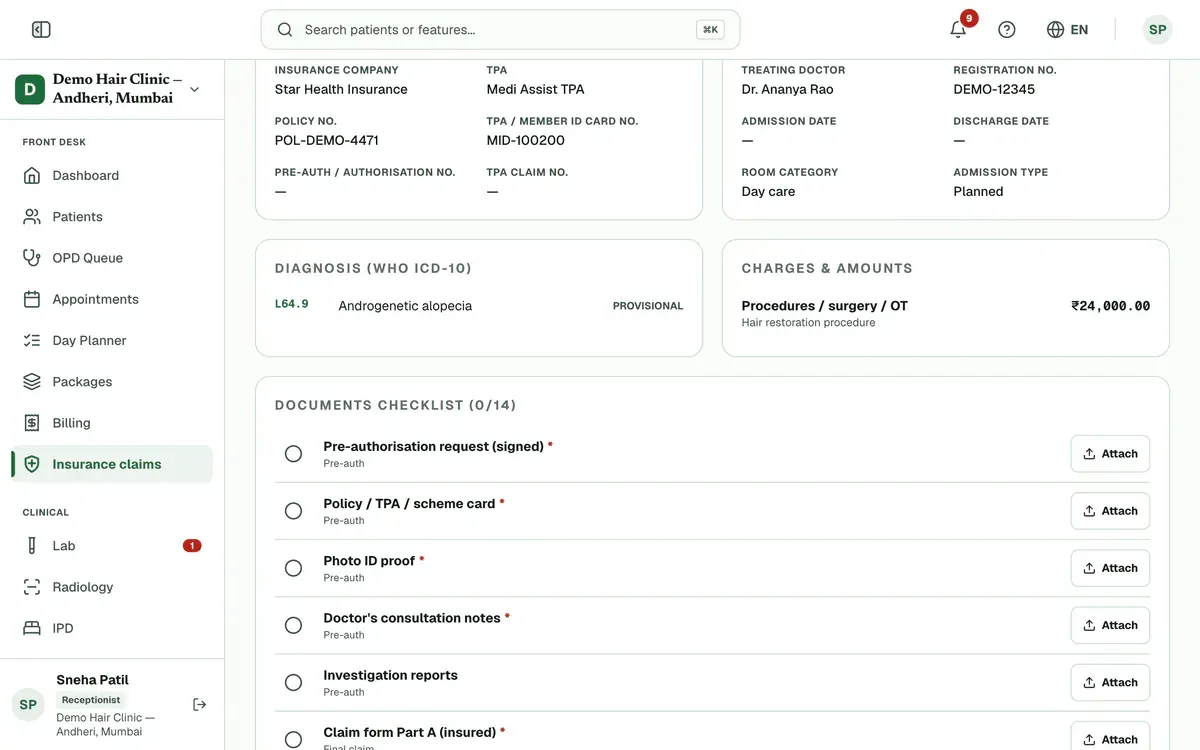
Step 4 of 8 Tip:Files are also saved to the patient’s documents. Check the TPA’s own list of papers too.
Press Submit pre-auth for a cashless claim, enter the estimated cost and confirm.
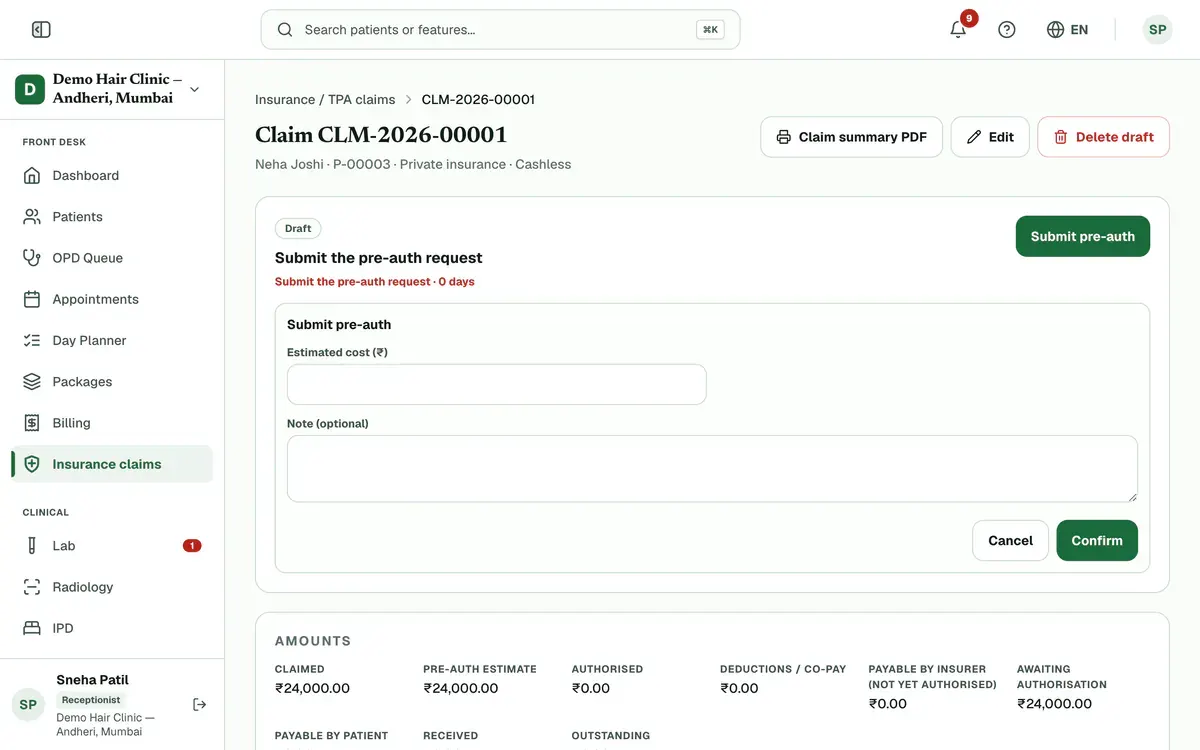
Step 5 of 8 Careful:A reimbursement claim has no pre-auth stage. A PM-JAY claim always needs one.
Record the TPA’s reply: press Record approval with the amount approved, or Record TPA query with what they asked.
Tip:To answer a query, press Edit to answer query to update the claim, then press the same step button again.
Careful:A note is needed when you record a query.
Press Submit final claim at discharge, then enter the amount claimed and the TPA claim number.
Press Record settlement when the insurer pays, then enter the amount received and the UTR.
Tip:For a part payment, press Record part payment. If the insurer refuses the claim, press Mark rejected and give the reason.
If something goes wrong
How do I answer a TPA query?
Press Edit to answer query, update what the TPA asked about, then press the same step button again, for example Submit pre-auth.
Do I always need a pre-auth?
Cashless and PM-JAY claims need one before the final claim. A reimbursement claim goes straight to the final claim.
Can I delete a claim made by mistake?
Only a draft claim can be deleted. Open it and press Delete draft. Bills on it go back to self-pay.
Related guides
Bill a company and collect its payment
Open Billing, press the Corporates tab and add the company with Add corporate. Then open an unpaid bill and press Bill to corporate to move its balance to the company’s credit. When the company pays, open its page and press Record payment. The oldest bills are settled first.
5 minIncluded in Nursing Home and aboveCreate a GST invoice
Open Billing, press New Bill, choose the patient or tick Walk-in customer, and type each item with its quantity, rate and GST percentage. Check the total, press Create Bill and confirm. The bill opens straight away so you can press Record Payment and take cash, UPI or card.
4 minIncluded in Clinic and aboveFind a bill and collect payment
Open Billing and type a bill number, patient name, UHID or phone number in the search box. Press a status chip such as Unpaid to narrow the list. Open the bill, press Record Payment, enter the amount and how it was paid, and confirm. The bill moves to Partial or Paid.
4 minIncluded in Clinic and above
Was this guide helpful?
Last updated 23 Oct 2026By the Clinizy Care product team