
Use the SayRx page
- Admin and clinic owner
- Doctor
Short answer
In Clinizy Care, open SayRx to start a voice prescription and see how SayRx is working for you. Press Speak a prescription, read your four numbers, and check Recently spoken for your latest drafts. The page shows only your own work, never the whole clinic’s.
Before you start
- Your clinic needs the SayRx add-on, and your role must be able to write prescriptions.
- Use a device with a working microphone when you are ready to speak.
Steps
Open SayRx from the left menu.
Tip:The numbers and the list on this page count only your own drafts, not the whole clinic’s.
Press Speak a prescription. A new prescription opens, and you choose the patient there.
Tip:After you choose the patient, press Speak and speak. Speaking and checking the draft work as they do in any prescription.
Careful:The button is switched off when this month’s drafts are used up or SayRx is not set up. The line beside the button says which.
Watch the sample next to the button to see SayRx listen, write and check a draft.
Tip:It is only a sample consultation, not one of your patients.
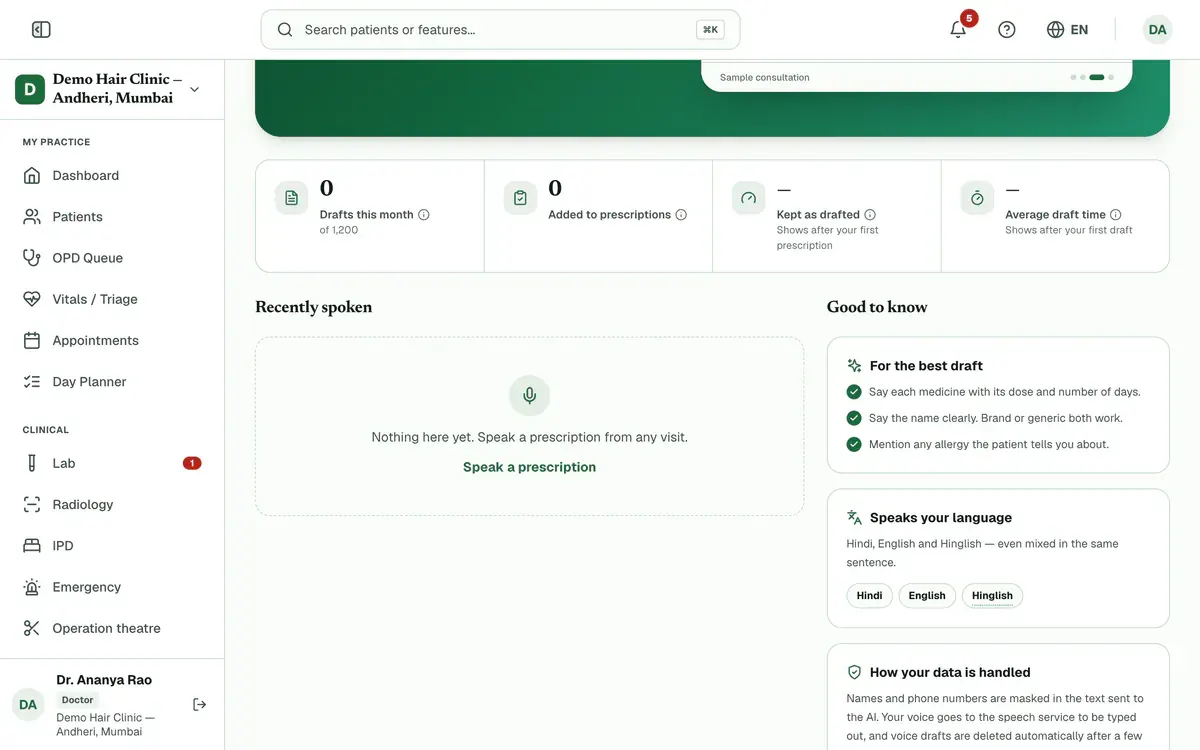
Read the four numbers under the button: Drafts this month, Added to prescriptions, Kept as drafted and Average draft time.

Step 4 of 7 Tip:Press the small info icon next to a number to read how it is measured.
Careful:Kept as drafted and Average draft time show a dash until there is something to measure. A dash does not mean zero.
Look at Recently spoken to see your latest voice drafts, newest first.
Tip:Each row shows the patient, how many medicines SayRx wrote and when you spoke.
Read the status on each row: Ready, Added, Discarded, Didn't finish, In progress or Processing.
Tip:Ready means SayRx wrote a draft that is not added yet. Added means it went into a prescription.
Careful:The list is a record only. You cannot open a draft or add it from here.
Follow For the best draft before you speak: name each medicine with its dose and days, speak clearly, and mention any allergy.
Step 7 of 7 Tip:Brand or generic names both work. SayRx flags anything it finds unclear.
If something goes wrong
Why is the Speak a prescription button switched off?
This month’s drafts may be used up, or SayRx may not be set up yet. The line beside the button says which. The count starts again on the 1st. You can still type the prescription.
What does Kept as drafted mean?
It is the share of what SayRx suggested that you issued without changing. It is measured from your issued prescriptions, so it shows a dash until you have issued one.
Why is an older draft missing from the list?
The list shows only your latest drafts, and voice drafts are deleted automatically after a few days.
Related guides
Write a prescription by voice with SayRx
Open a patient’s prescription and press Speak. Say the medicines with dose and days, tests, advice and follow-up in Hindi, English or Hinglish, then press Done. SayRx writes a draft. Check it, press Add to prescription, and then save or finalize as usual.
4 minAdd-on: SayRx — AI voice prescriptionOrder lab tests for a patient
Open Lab, go to the Orders tab and press New Order. Pick the patient and the tests, choose the priority and press Create Order. The order then moves through the lab from Ordered to Completed, and you can follow it in the same list.
4 minIncluded in Nursing Home and abovePrint or share a prescription
Open Prescriptions and find the finalized prescription under Recent Prescriptions. Press Print to print it, or WhatsApp to send it to the patient. The menu on the row also has Preview, Save PDF and Email. Drafts cannot be printed or sent.
3 minIncluded in Clinic and above
Was this guide helpful?
Last updated 23 Oct 2026By the Clinizy Care product teamSee the feature page