
Record skin vitals and watch progress
- Admin and clinic owner
- Doctor
- Nurse
- Technician
Short answer
In Clinizy Care, open the patient’s record and find the Skin progress card. Press Record skin vitals, fill in what you checked today, such as skin type, acne or melasma scores and safety flags, and press Save skin vitals. The form works out each score for you. From the second reading, the card shows what changed.
Before you start
- Check that the Skin progress card shows on the record. It is hidden if your clinic does not use skin vitals.
- Fill in only what you checked today. Every part is optional, but you need at least one.
- Some parts, such as the DLQI total or skin analyser readings, show only when they are switched on for your clinic.
Steps
Open the patient’s record and find the Skin progress card.
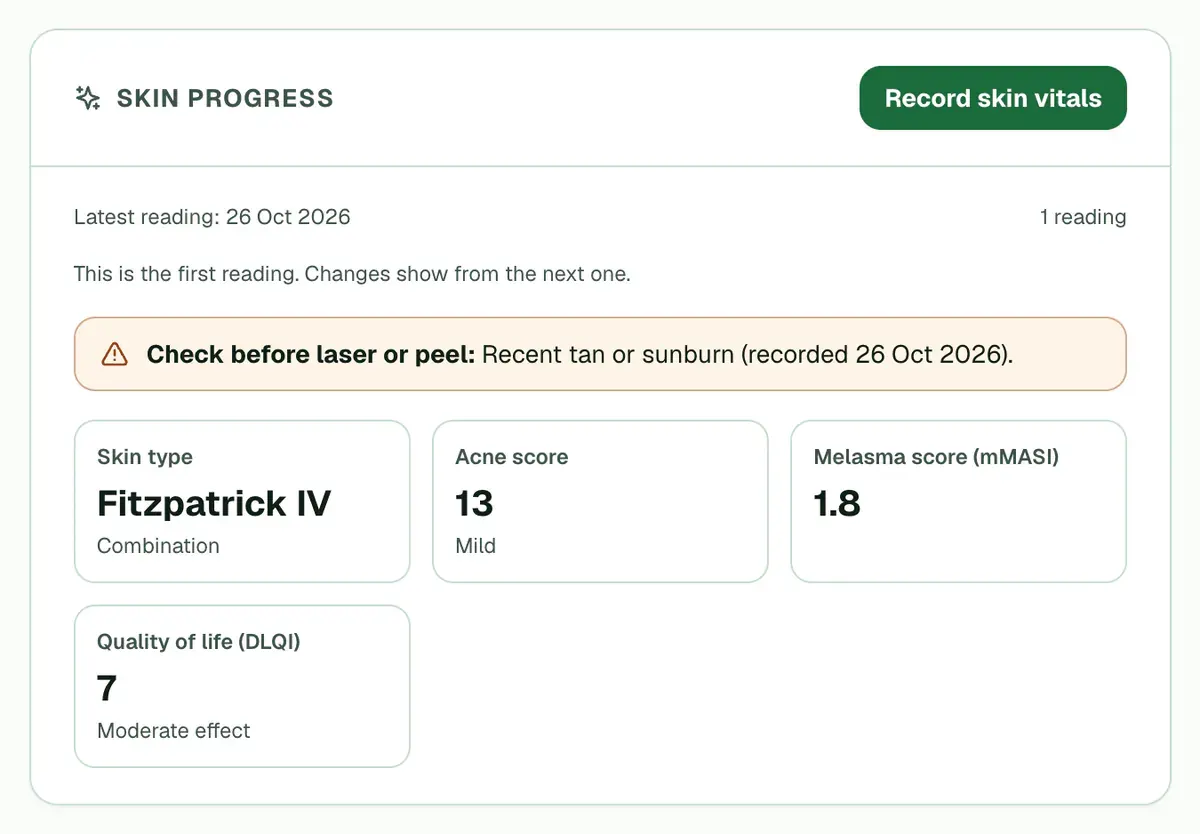
Step 1 of 8 Tip:The card shows the latest scores. A highlighted note lists any safety flag, with the date it was recorded.
Press Record skin vitals.
Tip:Or press Record vitals on the patient card and pick Skin vitals. If the patient is in today’s queue, the reading is linked to that visit.
Pick the Fitzpatrick type and the Skin type, then tick the Concerns you see.
Tip:Types I to VI run from the fairest skin to the darkest, and each button shows that tone. The form also shows the type recorded last time.
Press Score acne, then grade each area from 0 to 4. Tap the face map, or use the rows beside it.
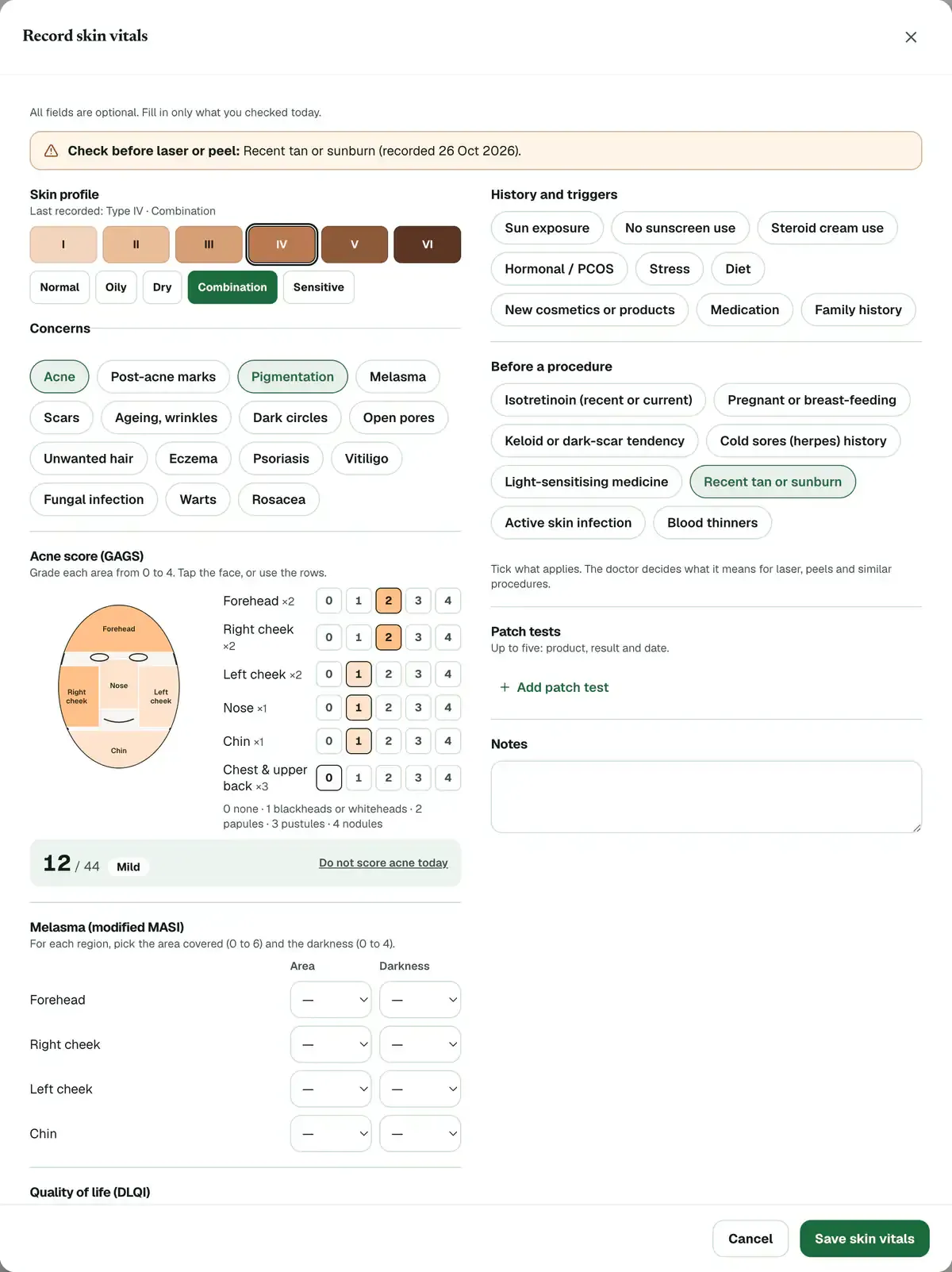
Step 4 of 8 Tip:Each tap on the face map raises that area by one grade. The form adds up the score out of 44. Press Do not score acne today if you did not check acne.
Choose the Area (0 to 6) and Darkness (0 to 4) for each melasma region you checked.
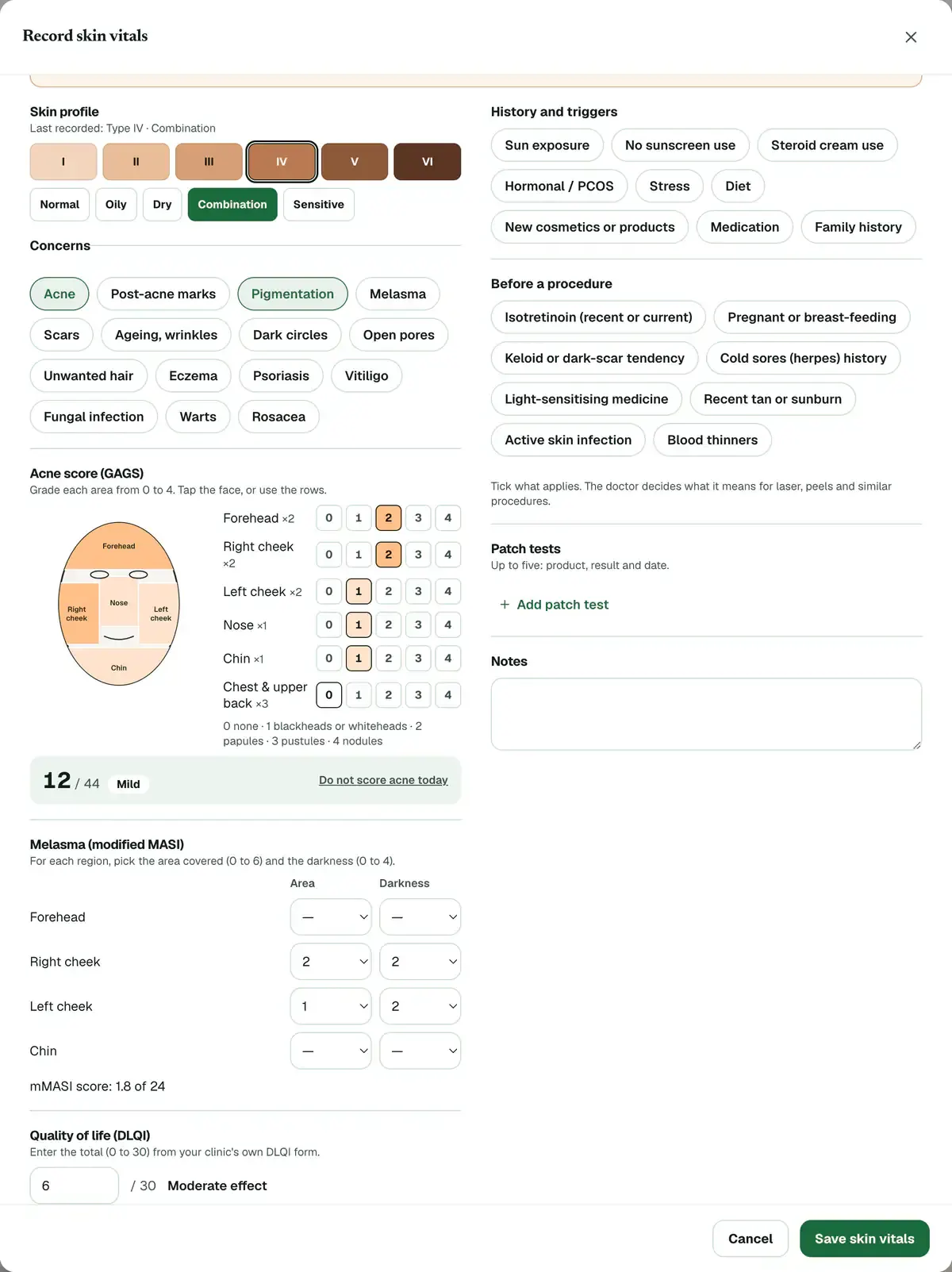
Step 5 of 8 Tip:The form shows the mMASI score out of 24. Leave a region empty if you did not check it.
Careful:Choose both numbers for every region you score. With only one, the form asks you to fix it before saving.
Tick anything under Before a procedure that applies, such as Isotretinoin (recent or current) or Recent tan or sunburn.
Careful:You only record what the patient tells you. The doctor decides what a flag means for a laser, a peel or a similar procedure.
Add Quality of life (DLQI), History and triggers, Patch tests or Notes if you have them.
Tip:For DLQI, type the total from 0 to 30 from your clinic’s own form. You can add up to five patch tests.
Press Save skin vitals. A message confirms that the reading was saved.
Tip:The first reading is the starting point. From the next one, the Skin progress card shows what changed since the first reading.
If something goes wrong
What do the acne, melasma and DLQI scores mean?
Each is a standard skin score, and a higher number means a bigger problem. Acne (GAGS) grades six areas, up to 44. Melasma (mMASI) rates dark patches, up to 24. DLQI rates how much the skin troubles daily life, up to 30.
Why does an old safety flag still show?
Every flag ever recorded stays on the card, with the date it was last recorded. A newer reading does not hide it, so the doctor can judge whether it still matters before a laser or peel.
Who can record skin vitals?
Roles that can record vitals or write prescriptions, such as admins, doctors, nurses and technicians, see Record skin vitals. Receptionists can read the card but cannot add readings.
Can I record skin vitals from the OPD queue?
Yes. In OPD Queue, press Record skin vitals on the patient’s card. It opens the Vitals form at Skin vitals, and the button gets a tick once the reading is saved.
Related guides
Record hair vitals and watch progress
Open the patient’s record and find the Hair progress card. Press Record hair vitals, enter the readings you have, such as grade, density or pull test, and press Save hair vitals. The first reading is the baseline. From the next one, the card shows what changed.
4 minAdd-on: Hair vitalsTake and compare clinical photos
Open the patient’s record, find the Photos card and press Add photos. Take or choose a photo for each view, then press Save photos. Once there are two sessions, press Compare to look at any two together. The card shows only if your clinic has the photo gallery, which comes with the hair and skin packs.
5 minAdd-on: Clinical photo galleryRecord a patient’s vitals
Open Vitals / Triage. Waiting patients are listed with the most urgent first. Press Record vitals next to a patient, type each reading and press Tab to move on, then press Save Vitals. Readings outside the normal range are highlighted. You can update a reading later.
3 minIncluded in Clinic and aboveRead a patient’s full record
Open Patients, search for the patient and press their name. The card on the left shows who they are and warns about allergies. On the right you will find the visit history, documents, prescriptions, lab orders, appointments and bills. You see only the parts your role needs.
4 minIncluded in Clinic and above
Was this guide helpful?
Last updated 26 Oct 2026By the Clinizy Care product team